Voicemail
This article covers how to leave voicemails for customers.
Calling customers is a major part of the customer service aspect of your position. If a customer does not answer your call, always leave a voicemail.
What to Say
When leaving a voicemail keep it brief. Providing too much technical information in the voicemail has the potential to lead to a lot of confusion either by the customer not understanding or you not remembering exactly what was said. Leaving a simple voicemail and providing detailed notes on the Work Order will help improve sharing information in the event you aren’t available when the customer calls back.
Begin the voicemail by introducing yourself and the company.Continue with the reason for the call but do not go into detail. Before ending the message leave the call back information. See the example below:
Good Afternoon, this is [Employee name here] from University PC Care. I am calling regarding the computer you left with us. We’ve finished the diagnostics and I’d like to go over that with you. Please give us a call back when you have the chance to at 252-558-1280, that’s 252-558-1280. I look forward to hearing from you.
Repeat the telephone number for clarification. Speak slowly and clearly. Do not speed through your message. It’s not a race to have the shortest message.
When voicemail is unavailable
When you run into a situation where the call is forwarded to a full mailbox, “this person is not accepting messages at this time”, etc. you will need to follow up via text message or email from the PCRT work order. There are templates available to choose from in the Send SMS (twilo) drop down menu.
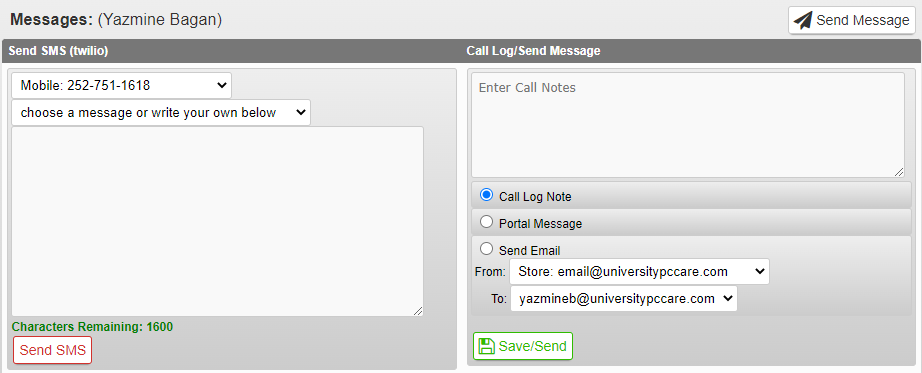
You can also create your own message but again leave it brief. See below for an example:
This is [Employee name here] from University PC Care. Please give us a call at 252-558-1280 to discuss your computer.
Make sure to leave your name, the company information and callback number.