Closing SupportPal Tickets
This article covers how to close tickets via Support Pal
Customers can reach out to us in a multitude of ways, the second most common method is emailing which goes into our ticketing system, SupportPal.
You will need access to SupportPal and Slack. If you currently do not have access to either program, please contact Admin. to request access to these programs.
Closing Tickets
There are three different options available when closing tickets.
- Close: closes the ticket while sending a closed ticket notification to the customer (check mark in image below)
- Close and Lock: closes the ticket without sending a closed ticket notification to the customer (click ellipses for dropdown menu)
- Block User: closes and deletes the ticket while blocking the user from the system (click ellipses for dropdown menu)
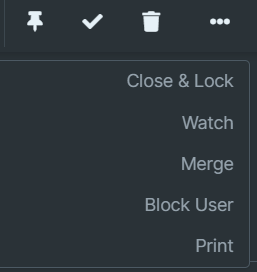
Typically, you will be using *Close *as the primary option.