Email Etiquette
This article covers how to professionally communicate via email.
In addition to calling, you will be sending emails to customers. Similar to phone etiquette, your email etiquette is just as important as your in-person customer service. There is more area for miscommunication and misinterpretation of what is being shared. Be sure remember the top three (3) rules of etiquette:
Consideration - Consider your customers time and situation.
Respect - Respect your customers opinions and input
Honesty - Be upfront and honest
These three rules of etiquette are the basis for the best practices of emailing customers.
Rules of Email Etiquette
Do not respond emotionally
Take a step back from an emotionally fueled conversation. Once you’ve sent a message it cannot be undone. A few minutes of internalizing and redirecting your emotions to formulate a professional and direct email will result in not furthering or escalating a situation.
Follow proper email format
There are four (4) parts to an email and they should be addressed as follows:
- Subject Line: be direct and brief
- Email Greeting: mention the recipient’s name and appropriate greeting
- Body: main message and question
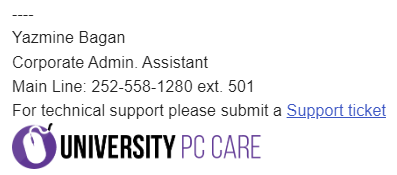
- Signature: should include your name, title and company information (see example)
Professionally Direct
When drafting an email to a customer, ensure it's professional and direct. This means do not go around in circles describing something that can be reduced. Provide enough information for the context of the conversation but leave it to the customer to ask for elaboration if something isn’t clear.
For example, if you are sending an email regarding repair suggestions you can simply say: _Based on our diagnostic results, the display needs to be replaced on your device. The cost will be $567 plus tax (parts & labor). If you’d like to move forward with the repairs please let us know by calling us at 252-558-1280 or responding to this email. _
Should the customer require additional information such as _“What diagnostics did you do?”_ then you can provide a more detailed message outlining what you did to make the determination the display needs to be replaced.
The first part of the email a customer will read is the Subject. This needs to be short and direct. Do not elongate the Subject or make it vague.
Don’t do: Subscription Expired, Payment not Received or Processed
Do: Mac Care Yearly Subscription Expired
Don’t do: As requested
Do: Direct Deposit Forms- J. Strickland
Write your email before adding recipients
It is best practice to draft your message before adding any type of recipients into the To section. This will ensure a message is not sent out prematurely.
Check your recipients, cc and bcc for accuracy
Double and triple check that the email addresses for your recipients are accurate. Plan who should be the main recipient of the email and add your cc’s and bcc’s after. You should limit the primary recipients to no more than two people.
CC’d people should be those relevant to the conversation or have an interest in the context of the conversation.
BCC’d people should be on our end who need to be informed but don’t need to be directly engaged in the conversation. For example, when sending an email to a dissatisfied customer with a resolution to the situation you will BCC your supervisor and other appropriate corporate team members for recordkeeping purposes.
Who to reply to
It is very important to make sure that you are replying only to relevant individuals. It is not always appropriate to click Reply All when responding to an email. Be aware of the context and relevance of information being shared to those tagged in initial messages.
How to reply
When replying it is important to stay on topic. Do not veer the conversation into another direction, stay on task. New threads should be created for different topics of discussion. If you are talking about scheduling a repair for device A do not begin to discuss device B in the same thread. It should have its own separate email thread.
Just as you would with in person customer service, take into consideration your tone and how your words can be interpreted. If you read your draft and feel it can be perceived any other way than you intended i.e. professional and direct, then it would be a good idea to make some revisions.
This is not to say that your email has to be perfect. Customers will read the message and interpret however they will.
Maintain your signature
From time to time, you will need to update your signature. This will include any name changes, title changes, telephone or address changes etc. Your email signature will be a point of reference and needs to be as accurate as possible. Links should be tested to ensure they are still redirecting to the appropriate sites. See the below example.
When to send
Emails should be used in conjunction with phone calls as follow-ups. If a customer requests information in writing, offer to send an email detailing the conversation. When you attempt to call a customer and they are not available or do not answer, mention that you will follow-up via email (if we have their email address on file).
Do not “spam” customers with emails.
If you have already emailed a customer once in the day, do not send another regarding the same topic unless there is a correction or additional relevant information that needs to be added. If that is the case, reply to the original email you sent so it is threaded into one chain instead of multiple emails regarding the same thing.
Allow customers up to two (2) business days to respond to an email before sending a follow-up on it.
When to reply
Not all messages are intended to be responded to. For instance, do not respond to automated messages. Also, do not respond to emails that are possible scams or phishing attempts.