Customer Portal in PCRT
The Customer Portal is a place where business users can view their open work orders, communications, invoices, and billing history.
Who has access to the portal?
Technically, any group that exists in PCRT that has a valid email address attached can access the portal. The link is not advertised, however, so only those who we have specifically shared the link with should be able to access the Portal. More specifically, portal access should only be granted to businesses to facilitate invoice payment and work order tracking.
Additionally, any UPCC employee that has access to view group information can view any group’s portal page.
View Customer Portal from within PCRT
While logged into PCRT, open the desired group page and click “View Customer Portal” to see our internal version of the Customer Portal. This portal is the same that the customer will see when they login.
Customer-facing Portal access
Customers should navigate to https://mybiz.care/portal to access the portal login page.
Accessing the portal for the first time
The customer first needs to register for portal access with the email account we have on file for the group. To do this, click on the “Register - Forgot password” link and enter the email address that is tied to the group. If the email is valid, the customer will receive an email from PCRT with their temporary password and a link back to the sign-in page.
Returning to the portal
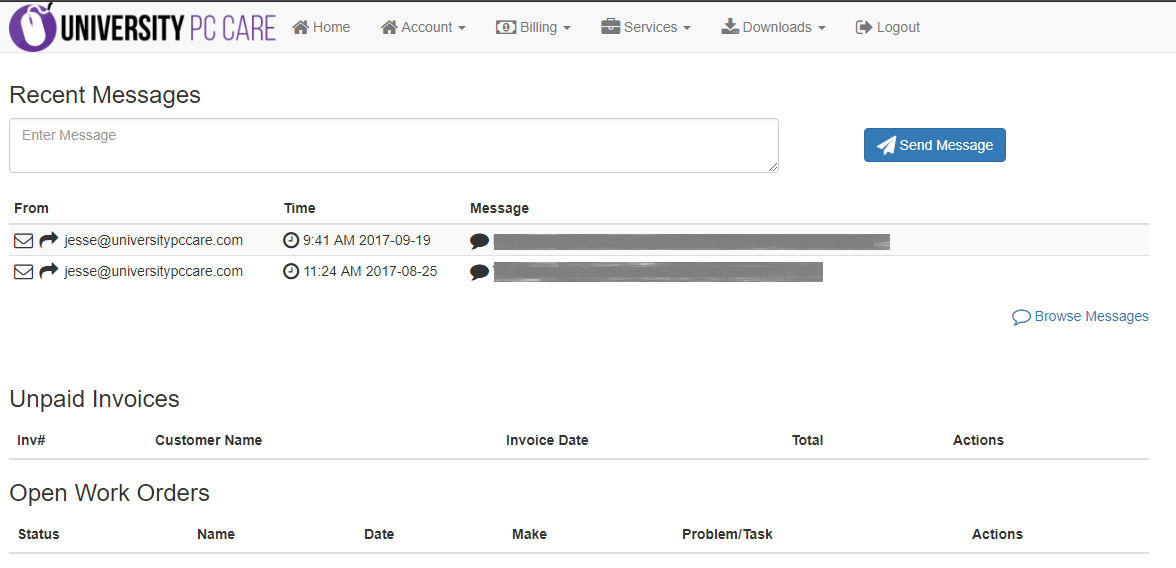
Once a customer has created their login information, return to the portal login page and login using the group email and password. The customer will be taken to the portal home page:
| (Click to see larger picture) |
From here, the customer has the option to view all recent communications that have been recorded in PCRT, as well as quickly view unpaid invoices and open work orders.
The navigation options along the top are largely self-explanatory:
- Account: Change information about the account. Most importantly, the customer may change their password from this screen.
- Billing: View a complete history of invoices and receipts.
- Services: View all service contracts, work orders, and block of time contracts
- Downloads: View downloads that have been attached to this group. For example, groups with BizCare can find their BizCare installer here.
- Logout