Resolution Review
This article covers how to escalate beyond Channel Support Services (CSS) after exhausting other available resources.
Review the Apple articles listed in the reference section for information on how to escalate issues through CSS first. Then you can proceed with contacting Resolution Review. Resolution Review is the last resource before going directly to our Apple Account Manager. This team is dedicated to reviewing unique situations and providing a resolution. Be sure to provide as much information as possible.
When gathering information make sure to notate all escalation numbers, repair numbers, invoice/debit memo numbers, etc. Each piece of information is important or more relevant than you may think. Once you have all your information together, determine the main issue you are facing and the direct result you are looking to achieve. If necessary draft your responses prior to reaching out to Resolution Review.
Who to Email
When contacting Resolution Review it's important to email your Apple Managers and UPCC supervisors. This ensures that everyone is apprised of the situation. Use the emails below:
Resolution Review
resolution_review_amr@apple.com
Apple Managers
Raj Balwani: raj.balwani@apple.com
Shiina Yamada: syamada@apple.com
UPCC Supervisors
Ashton James: ashton@universitypccare.com
- Jesse Strickland: jesse@universitypccare.com
- Zac Todd: zact@universitypccare.com
You may also include the technician(s) assigned to the repair to keep them informed as well but it is not required.
Resolution Review Email Template
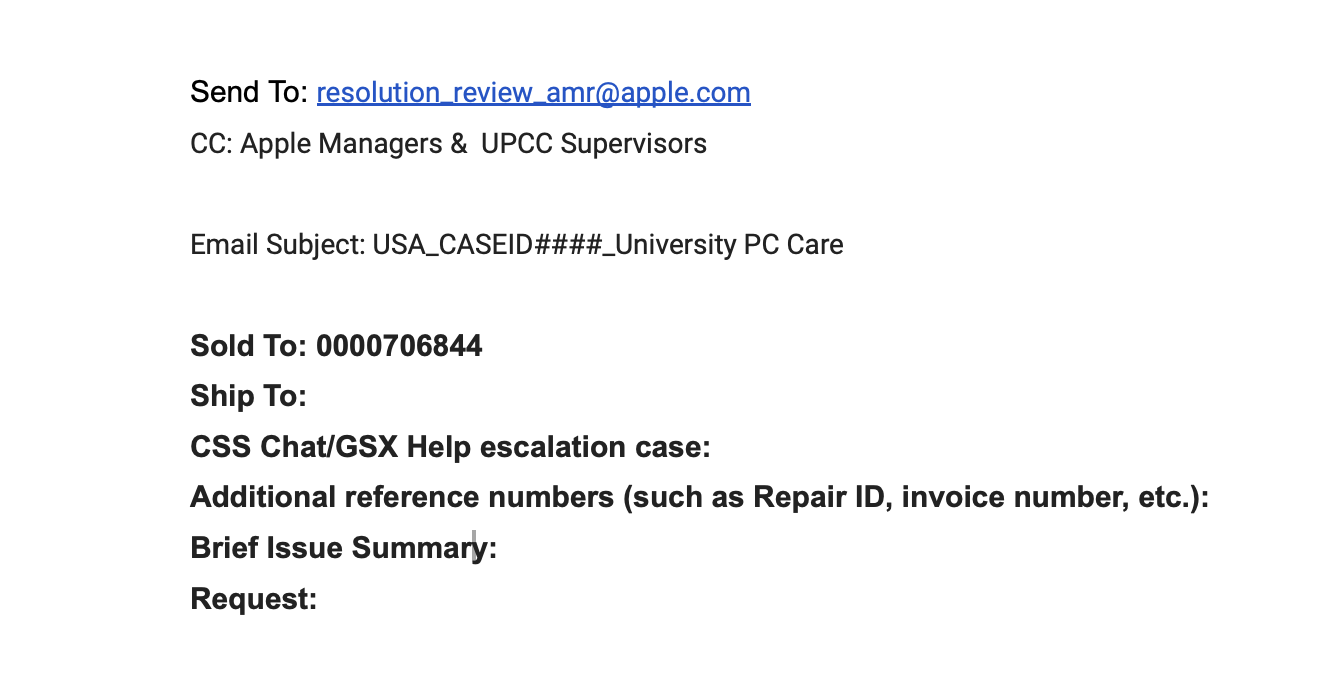
The template above is the format Apple requires us to use when contacting Resolution Review. Make sure to leave these sections bold while leaving the responses in the last three (3) sections in plain text to differentiate the information. See the example below:
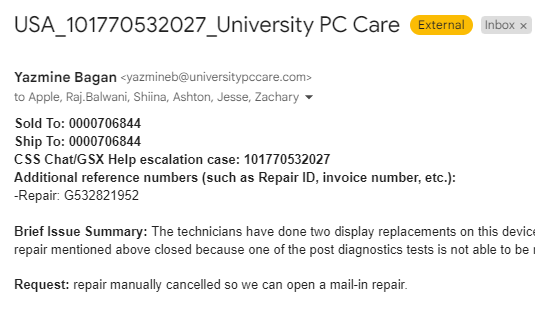
See the break down of the template below:
- Sold To: this number will remain the same, it is our Apple Account Number.
- Ship To: this number will change based on the store the repair is assigned to.
- Greenville: 0000706844
- New Bern: 0001109598
- CSS Chat/GSX Help escalation case: this will be the main escalation ID you are contacting about, the one that needs to be the focus of the discussion. The escalation ID used here will also take the place of _CASEID#### _ in the email subject line.
- Additional reference numbers (such as Repair ID, invoice number, etc.): list all additional relevant numbers here in a dash list format stating the type of reference number it is. See the example image above.
- *Brief Issue Summary: *though it says “brief”, be as detailed as possible when describing the situation. Include dates and timelines, reference the repair and other important reference numbers you have listed, contact with customers, etc. Also include what you believe the solution should be and why.
- *Request: *be direct with the request. State clearly what it is you are looking to have done. The reason for the request should already be included in the summary of the situation.
Following Up
After you’ve sent the email to Resolution Review, you will receive a response from them acknowledging receipt and providing you with a turnaround time for their investigation. If you do not receive an acknowledgement email within forty-eight (48) hours, send a follow up email under the same email thread requesting an update. Make sure to “reply all” when communicating to keep everyone informed.
If you have yet to receive any acknowledgement or response from Resolution Review, contact our Apple Managers directly in a separate email copying UPCC supervisors.
References
OP1514- SERVICE: Select the correct issue category when contacting Apple
OP580- SERVICE: Creating and managing escalations in GSX